Meta Ads Manager
- 4.0
- Rating
- 10.00M
- Installs
- Free
- Price

 Analysis by App-foxy
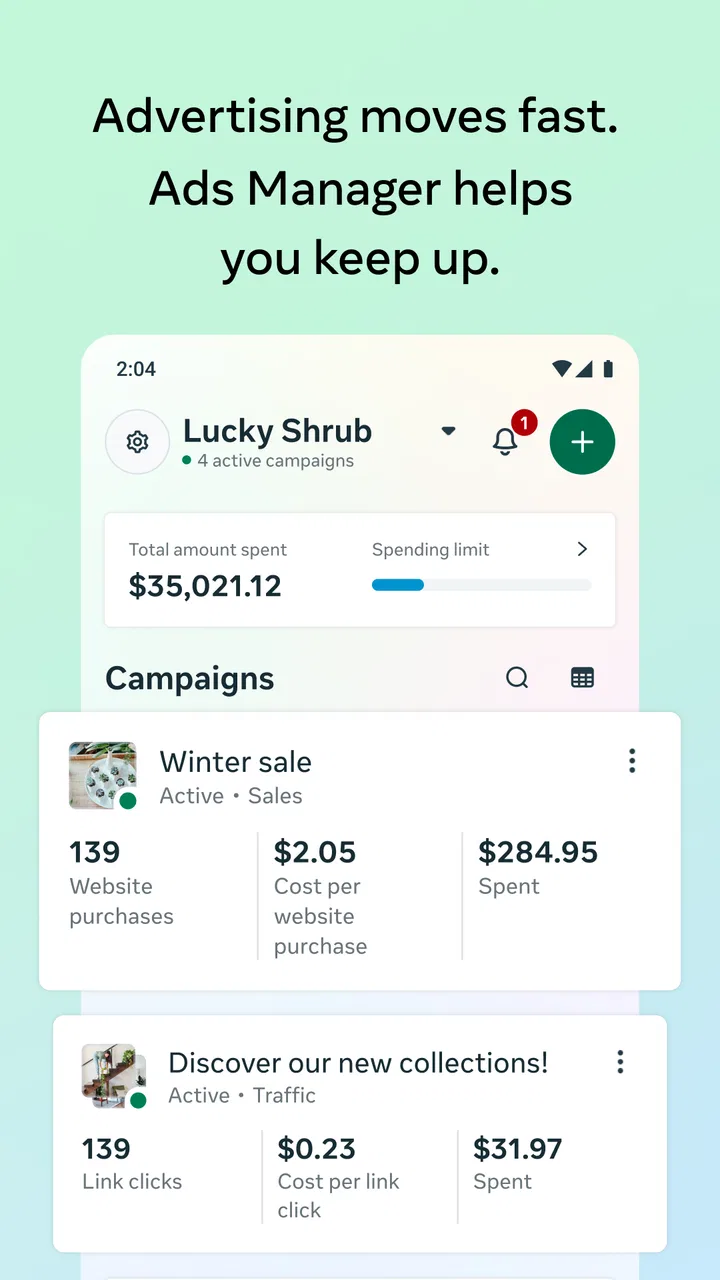
Managing advertising from a phone sounds simple until a campaign needs attention at an inconvenient moment. I found Meta Ads Manager most useful in exactly those situations: checking whether an ad is delivering, making a careful adjustment, or creating a campaign when I am away from a desktop. It is a business app from Meta Platforms, Inc., focused on handling Meta advertising work on the go rather than replacing every part of a full advertising workflow.
That distinction matters. I would recommend it to a small-business owner, freelancer, or social media manager who needs practical access to active campaigns throughout the day. I would be more cautious about treating it as the only workspace for a large, complicated advertising operation. The mobile format is convenient, but convenience and complete control are not always the same thing.
How Meta Ads Manager feels in everyday advertising work
The app was previously known as Facebook Ads Manager, and its current identity reflects the broader Meta advertising environment. Its main appeal is direct: I can open a phone and deal with advertising tasks without waiting until I return to a computer. That makes it particularly valuable for people who work from different locations or who need to respond during a short break.
You May Also Like

 Blood Strike: 2.5 Anniversary
Blood Strike’s Loadouts Turn Every Drop Into a Tactical Gamble
A close look at Blood Strike’s custom loadouts: how fast access to signature weapons reshapes its battle royale rhythm, rewards preparation, and narrows the gap between fights.

 Pandora - Music & Podcasts
Pandora’s Music Is Easy to Start, but Harder to Recover
Pandora’s strength is its low-effort path from a seed to a station. Its weak spot is how much confidence it asks you to place in connection, setup, and quiet recovery.

 8 Ball Pool
8 Ball Pool Is Built on Rivalries, Rematches, and Routine
A close look at the rivalries, rematches, shared routines, and unanswered safety questions that turn a quick pool match into a persistent mobile community.

 Samsung Music
Samsung Music’s Quiet Strength Is Playing What You Already Own
Its reach comes less from spectacle than from dependable access to a personal library. That simplicity is both the app’s strongest retention engine and its ceiling.

 AccuWeather: Weather Radar
AccuWeather Review: A Quick, Clear Forecast for Everyday Decisions
For everyday plans, the best forecast is the one you can understand quickly. AccuWeather makes rain timing, radar, and local conditions easy to act on, with a few trade-offs.

 Hill Climb Racing
Why Hill Climb Racing Still Turns Crashes Into One More Run
A tiny car, a bumpy hill and one more upgrade: Hill Climb Racing keeps resurfacing because its simple chaos makes every near-miss feel personal.
More From Our News Desk
View All News


In my experience, the best way to use it is as a focused control room. I would not begin by casually tapping through every option. I would first decide what needs attention: delivery, budget, creative status, audience settings, or a new campaign. That habit keeps the mobile interface from becoming overwhelming and reduces the chance of changing something simply because it was easy to reach.
The app is free, has an Everyone age rating, and sits in the Business category. Its scale is also reassuring for people who prefer established tools: it has passed ten million installs and holds a 4.3 average from roughly 508 thousand ratings, alongside about four thousand written reviews. Those figures do not guarantee that every phone or account will feel identical, but they do show that this is not an obscure companion utility.
The current version is 465.1.0.63.108. I would keep the app updated, especially when using it for time-sensitive campaigns, because advertising tools can change as account features and campaign workflows evolve. I would also avoid making a major change while distracted on a small screen. A phone is excellent for access, but it demands more deliberate checking before confirming an edit.
Where the mobile format saves time
The clearest advantage is awareness. If I am running a promotion for a local service and notice that inquiries have suddenly increased, I can inspect the campaign without opening a laptop. If a scheduled promotion is approaching, I can review its status while travelling. These are modest actions, but they prevent a campaign from becoming invisible between desktop sessions.
A useful workflow is to separate monitoring from editing. I first look at the campaign or ad set that needs attention, check the relevant result and delivery context, and only then decide whether an adjustment is justified. This avoids the common mistake of reacting to one disappointing moment. Mobile access makes quick reactions tempting, so a short pause is part of using the app well.
Creation is also more practical when the basic ingredients are ready. I would prepare the copy, image or video, destination details, audience idea, and budget decision before opening the app. That turns the phone into a place for assembling and checking a campaign rather than a place where I invent everything under pressure. The difference is important because typing and reviewing complex settings on a small display takes more concentration than doing the same work on a larger screen.
Speed expectations during normal use
I would set moderate expectations for speed. An advertising manager has to load account information, campaign structures, delivery details, and editing controls, so it is not the kind of app I judge by whether every screen appears instantly. A short wait while information refreshes is less concerning than a wrong or incomplete status, and I prefer the app to show current account information carefully rather than rush through a change.
For quick checks, the experience should feel more efficient than signing in through a mobile browser and navigating a desktop-oriented interface. The app’s purpose is clearer, and that focus helps when I only need to inspect an active campaign or handle a small task. The benefit is greatest when I already know which campaign I want to review.
Speed can feel less impressive when I move between several layers of an account. Jumping from campaigns to ad sets, then to individual ads and their settings, naturally requires more loading and more visual checking. I would not interpret every pause as a stability problem. Sometimes the real friction is the amount of information being organized, especially when an account contains many campaigns with similar names.
My practical tip is to use consistent names for campaigns, ad sets, and ads. That is not a glamorous feature, but it has a direct effect on perceived speed: finding the right item quickly is often more valuable than shaving a moment from a screen transition. Clear naming also reduces the risk of editing the wrong campaign from a phone.
What happens during heavier use
The app becomes more demanding when I use it for several tasks in succession. Creating a campaign, checking multiple levels of settings, reviewing performance, and making edits in one sitting requires more attention than a single status check. The interface may remain usable, but the mental workload rises because a small screen compresses information that is easier to compare on a monitor.
This is where I see the strongest case for combining mobile and desktop work. I would build a detailed campaign on a larger screen when there are many variations or decisions to compare. Then I would use the phone for supervision, small corrections, and urgent checks. That division gives each format the job it handles best instead of forcing the mobile app to imitate a full desktop workspace.
A second heavy-use moment is account maintenance. When several promotions overlap, similar creative names and repeated audiences can make selection tiring. I would slow down before confirming anything that affects spending or delivery. The convenience of being able to act immediately should not become pressure to act immediately.
For reporting, I would treat the app as a way to understand the direction of a campaign rather than as my only place for deep analysis. A phone is well suited to answering questions such as “Is this active?” or “Which campaign needs my attention?” It is less comfortable for comparing many dimensions at once or documenting a detailed performance review. For those tasks, a larger display and a more deliberate note-taking process are better alternatives.
Stability and recovering from interruptions
Reliability is not only about whether an app opens. In advertising, recovery matters because a phone call, weak connection, low battery, or accidental navigation can interrupt a task. I approach Meta Ads Manager with the assumption that any important change deserves a confirmation check afterward. I do not rely on memory of what I tapped; I return to the relevant campaign and verify its visible state.
That habit is especially useful after creating or editing an ad. If the app closes or the connection changes during a task, I would reopen it, locate the campaign, and inspect whether the intended status and settings are actually present. This is a simple recovery routine, but it prevents an interrupted session from turning into an unnoticed mistake.
I also prefer making one meaningful change at a time when working from a phone. If I alter several settings in rapid succession, it becomes harder to identify which action caused an unexpected result. A slower sequence creates a clearer trail for troubleshooting. This is one of the most important differences between casual mobile use and responsible campaign management.
The app’s large user base and established developer give me more confidence than an unfamiliar advertising tool, but they do not remove the need for verification. Account access, campaign state, and delivery can be affected by circumstances outside the app itself. My view is that the application is a useful access point, not a substitute for checking the real outcome of an important advertising decision.
Resource demands and phone limitations
I would not describe this as a lightweight note-taking app. It handles business information, campaign structures, media-related work, and account controls, so the experience depends on the phone’s available resources and the complexity of the account. A newer device with a stable connection will naturally feel more comfortable than an older phone already struggling with several open apps.
When my phone is busy, I would close unnecessary apps before creating or editing a campaign. I would also avoid doing a complicated setup while the battery is nearly empty or while moving between unreliable connections. These are ordinary precautions, but they matter more when a task involves multiple screens and a final confirmation.
Screen size is another real constraint. On a larger phone, campaign names and settings are easier to scan. On a compact display, I would expect more scrolling and a greater need to check that I am editing the intended level of the campaign structure. People with visual fatigue or those who regularly compare several options may find a desktop browser more comfortable.
Storage and network conditions can also shape the experience when working with advertising media. I would prepare creative files before starting the mobile workflow and avoid treating the app as a convenient place to improvise large production changes. The less file handling and repeated uploading I need to do on the phone, the more predictable the session becomes.
Who should use it, and who should choose another approach?
This is a strong fit for a small retailer checking a weekend promotion, a consultant monitoring lead generation while visiting clients, or a freelance manager responsible for several accounts during the day. In each case, the value comes from reducing the gap between noticing a problem and examining it. The app makes advertising work more available when a computer is not.
It is also useful for someone learning the rhythm of campaign management, provided that learning happens carefully. I would use it to observe how campaigns are organized and to practice small, reversible tasks before attempting major changes. The mobile format can make the account feel approachable, but it should not encourage beginners to change budgets or targeting without understanding the consequences.
I would choose a desktop browser as the primary workspace for a large agency team, a campaign with many creative variations, or a detailed reporting session. A browser gives me more room to compare settings, keep reference material visible, and review a broader picture. A dedicated analytics tool may also be better when the main requirement is long-term reporting rather than campaign control.
People who rarely advertise at all may not gain much from installing a separate management app. If a campaign is occasional and uncomplicated, browser access may be enough. Conversely, someone managing active campaigns every day will likely appreciate having a focused mobile option available, even if it is not the only tool they use.
My practical routine for safer mobile management
I would begin each session by identifying the exact campaign and the reason for opening the app. “Check delivery” is safer than “look around and see what happens.” I would then review the current state before touching a control. This is particularly important when several promotions have similar names or when a quick decision could affect spending.
For a new campaign, I would prepare the creative and written details outside the rushed moment, then use the app to assemble and review them. Before confirming, I would read the audience, budget, schedule, destination, and selected creative as separate checkpoints. That may sound slower, but it is faster than repairing an avoidable setup error.
For an existing campaign, I would record the reason for any change in a simple note. If performance later shifts, I can remember what changed and when, rather than guessing. The app gives me access to controls, but a personal change log gives me context that a mobile screen cannot provide.
After an interruption, I would reopen the campaign and verify the final state. If the app feels slow, I would avoid repeated taps, wait for the screen to settle, and check whether the action completed before trying again. Repeated tapping is a small but realistic source of confusion in any mobile control panel.
Finally, I would reserve deeper analysis for a larger screen. The phone is where I notice, confirm, and respond. The desktop is where I compare, document, and plan. That division is the most reliable way I found to get value from the app without letting its convenience dictate every advertising decision.
My performance verdict
Meta Ads Manager performs best as a dependable mobile companion for active advertising, not as a complete replacement for every desktop task. Its speed is most satisfying when I need a focused check or a modest correction. During heavier work, the main limitations are the density of account information, the smaller display, and the extra care required to confirm that I changed the right item.
I appreciate that it is free and available to a broad audience, while the Everyone rating makes its intended access straightforward. The 10M+ install reach and 4.3 average rating suggest that many advertisers find the approach useful, though my recommendation still depends on the account’s complexity and the person’s working style. A high rating cannot make a phone screen as spacious as a monitor.
The best reason to install it is control between desktop sessions. I would keep it on my phone if campaign timing matters, if I travel for work, or if I need to respond to delivery questions during the day. I would skip relying on it alone if my work involves extensive comparisons, elaborate campaign builds, or detailed reporting.
Overall, I see Meta Ads Manager as a practical business tool with a clear job: keep Meta advertising within reach when I am away from my computer. Used with careful naming, one-change-at-a-time editing, and a deliberate recovery check after interruptions, it can make campaign supervision much less stressful. Used as the sole environment for complex advertising, it becomes less comfortable and more error-prone. For the right workflow, that balance makes Meta Ads Manager worth installing; for a desktop-first analyst, the usual browser workspace remains the better home base.
Meta Platforms, Inc. has kept the app focused on mobile campaign access since its release on June 29, 2015, and the current version continues that role. I would recommend it to a friend who wants practical access rather than a promise that a phone can replace an entire advertising desk. That is a modest promise, but in everyday campaign management, it is the one the app is best positioned to keep.
FAQs for Meta Ads Manager
01What is Meta Ads Manager and what can I do with it?
Meta Ads Manager is a mobile application designed to help businesses manage their advertising campaigns on platforms like Facebook and Instagram. With this app, users can create, edit, track, and optimize ads on the go. It's a powerful tool for marketers looking to enhance their advertising strategies and reach their target audience more effectively.
02Is Meta Ads Manager free to use, or are there any costs involved?
Downloading and using the Meta Ads Manager app is free. However, creating and running ads on Facebook, Instagram, or other platforms incurs costs based on your chosen budget and bidding strategy. The app itself does not charge any fees, but advertising expenses are determined by your specific campaigns.
03How user-friendly is Meta Ads Manager for beginners?
Meta Ads Manager is designed with an intuitive interface, making it accessible for beginners. It offers walkthroughs and tips to guide new users through setting up campaigns. While it might take some time to fully understand all features, the app’s layout is straightforward, helping users manage ads efficiently without requiring extensive prior experience.
04Can I access all my ad accounts through Meta Ads Manager?
Yes, Meta Ads Manager allows users to manage multiple ad accounts from a single interface. This feature is particularly useful for agencies or businesses handling several campaigns across different accounts. You can easily switch between accounts and monitor the performance of each campaign in one place.
05What devices and operating systems support Meta Ads Manager?
Meta Ads Manager is available for both Android and iOS devices. It requires Android 5.0 or later and iOS 11.0 or later to function properly. Ensure your device meets these requirements for a smooth experience. Regular updates are recommended to access the latest features and improvements.
Pros
- User-friendly interface
- easy navigation.
- Real-time performance analytics.
- Customizable ad targeting options.
- Seamless integration with Facebook.
- Detailed reporting and insights.
Cons
- Complex features for beginners.
- Occasional bugs and glitches.
- Limited optimization for small screens.
- Requires stable internet connection.
- Learning curve for advanced tools.

Meta Ads Manager
Gallery